Labelling for Medical Software Compliance in the EU and UK
Labelling is a key part of regulatory compliance and patient safety for medical software, whether it’s a standalone product (SaMD) or built into a physical device. Both the EU and UK have strict labelling rules to help users identify the product, understand how to use it, and follow any safety instructions.
This guide focuses on software-only and embedded medical software devices that fall under Class I or IIa/IIb according to Rule 11 of the EU MDR 2017/745 and UK MDR 2002.
We break down current labelling expectations, highlight shared principles and key differences since Brexit, and clarify what labels must include, what’s optional, and where relevant regulations apply.
EU & UK Regulatory Framework and Key Definitions for Medical Software
While EU and UK labelling rules for medical devices follow similar principles, the underlying regulations differ. In the EU, labelling is governed by the MDR (Regulation (EU) 2017/745), which includes detailed General Safety and Performance Requirements (GSPR), especially in Annex I, Chapter III.
The UK, following Brexit, continues to use the Medical Devices Regulations 2002 (UK MDR 2002), which reflect the older EU directives like 93/42/EEC. Since the MDR came into effect after Brexit, its newer provisions were not automatically adopted into UK law. This includes elements like UDI and expanded labelling rules.
As a result, UK labelling requirements still align more closely with the pre-MDR framework, though regulatory updates are expected as the UK develops its own revised system.
Labelling in a regulatory context refers to the written, printed, or graphic information associated with a medical device. This includes:
- The label on the device (or its immediate packaging),
- The packaging labels for each unit or group of units, and
- The information for use (e.g. IFU or user manual).
For software medical devices delivered entirely electronically, “labelling” includes on-screen elements like splash screens, about dialogs, and help files, as well as any supporting documentation provided in-app or online.
Under the EU MDR, manufacturers must supply all information needed to identify the device and manufacturer, along with any relevant safety or performance details. The UK has similar expectations under the Essential Requirements of the UK MDR 2002, requiring clear, sufficient information to ensure safe use and proper identification.
Software as a Medical Device (SaMD) refers to software that functions as a medical device on its own, while embedded software is built into a hardware device and supports its operation. Both must meet labelling requirements, though the format may differ.
Embedded software is usually covered in the device’s labelling, with details like software version included in the IFU. In contrast, standalone apps often display labelling information digitally. Regardless of how the software is delivered, the core requirement remains the same. Users, whether they are clinicians, patients, or technicians, must have the information needed to identify the product and use it safely.
Key Labelling Elements for Medical Software Devices
Labelling elements fall into several key categories. Below, we outline each one, explaining general expectations and highlighting any differences between EU and UK rules. These apply to both standalone software and embedded systems. The format may vary, whether it’s a physical label or on-screen display.
1. Device Identification and Traceability
Each medical device must be clearly identified, and for software, this usually includes the product name and version number. Under the EU MDR, the software version is part of the manufacturing information and is linked to the device’s UDI (Unique Device Identification). This helps track which version is in use, especially important when updates are made.
The UDI system includes both a device identifier (UDI-DI) and a production identifier (UDI-PI), which for software includes the version or release number. If the software is distributed online, the UDI can appear electronically, such as in an “About” screen, as long as it is easily accessible. If distributed on physical media (like a CD or USB), the packaging must display the UDI just like with hardware devices.
In the UK, current regulations (UK MDR 2002) don’t require UDI for devices sold in Great Britain, as UDI was introduced under the EU MDR. However, many manufacturers use UDI voluntarily for consistency across markets.
While future UK regulations may include UDI or similar systems, for now UK-only devices follow older rules. They use a lot or serial number for traceability without a mandated barcode. Still, it’s good practice to include software version numbers on labels to support revision tracking and post-market safety monitoring.
Another key labelling element is the device’s intended purpose. Under the EU MDR, this must be clearly stated either on the label or in the IFU so that users understand what the software does.
For example: “Radiological image analysis software for diagnostic use” or “Mobile app for monitoring insulin dosing.”
In most cases, the detailed intended use appears in the IFU or user manual rather than on a small label or splash screen, but it must always be easily accessible. UK regulations have similar requirements, aligned with the EU’s Essential Requirements, typically placing the intended use in the IFU as well.
Expiration or Date of Manufacture: Most software devices don’t have a traditional expiration date like consumables. However, if performance may degrade over time or the software is only validated for a specific period, this should be clearly stated.
Under the EU MDR, manufacturers must indicate either the safe-use time limit (if applicable) or the date of manufacture, which is often the release date for software. The UK follows similar guidance: include an expiration date if relevant, such as for software tied to aging hardware or expiring certificates.
In practice, expiry dates rarely appear on software labels. Instead, lifecycle details or support periods are usually included in the IFU or technical documentation.
2. Manufacturer and Representative Information
All medical device labels must include the manufacturer’s name and address. For software, this can appear on screen, such as in an “About” section, or be included in digital documentation.
Under the EU MDR, this is mandatory, and the full name and address typically appear on the packaging or in the IFU. For software, it’s common to display this information in the splash screen, help files, or installation materials, as long as it’s easy for users to find.
If the manufacturer is based outside the EU, the EU MDR requires that the label, packaging, or IFU includes the name and address of the EU Authorised Representative (AR). It must also include a symbol identifying them, typically the ISO 15223-1 icon showing a person’s head next to a building.
Similarly, in the UK, foreign manufacturers must appoint a UK Responsible Person (UKRP) for devices sold under the UKCA mark. The UKRP’s name and address must appear on the label or IFU. While there’s no dedicated ISO symbol for the UKRP, manufacturers often use the AR symbol with a note like “UK Rep.”
A key detail: the UK still accepts CE-marked devices on the Great Britain market. If a device is only CE marked (not UKCA), the UKRP info doesn’t need to appear on the label. But if the product carries a UKCA mark, UKRP details are required.
Manufacturers must provide contact details so users can report incidents or complaints. This may be just an address or may also include a phone number or email. These details are typically found in the IFU.
Both EU and UK regulations expect serious incidents to be reportable to the manufacturer or their representative, making this a key part of labelling and post-market vigilance. IFUs often include customer support info or links to reporting portals.
3. Conformity Marks (CE and UKCA)
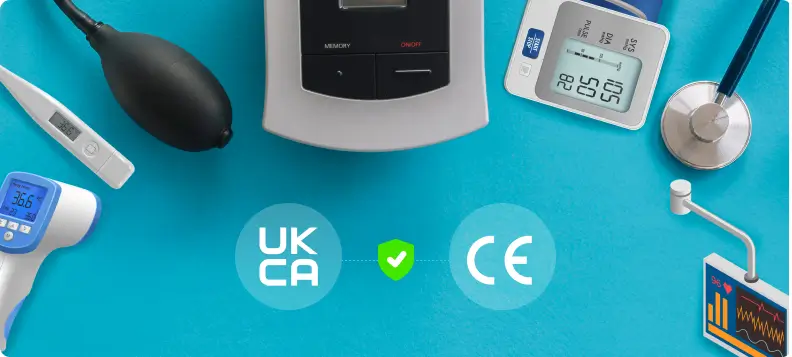
One of the most visible parts of a medical device label is the conformity mark. CE in the EU and UKCA in Great Britain. These symbols show that the device meets regulatory requirements and has passed the necessary conformity checks.
CE mark
The CE mark is mandatory for medical devices sold in the EU (and Northern Ireland). For software, it’s usually shown in the digital IFU or About screen, and on packaging if the software is delivered on a physical medium. The CE symbol must follow specific size and format rules, and if a Notified Body is involved (e.g. for Class IIa or higher), their 4-digit number must appear next to it (e.g. “CE 1234”).
Only devices that fall under EU medical device regulations should carry the CE mark. General wellness or educational apps must not use it. Using the CE mark incorrectly or decoratively is not allowed under EU law.
UKCA Mark
The UKCA mark is the UK’s post-Brexit equivalent of the CE mark, used for devices sold in Great Britain. It shows compliance with UK MDR 2002 and other UK-specific rules. While CE-marked devices are still accepted in the UK (and will continue to be beyond December 2024), some manufacturers are starting to use UKCA, especially for new or UK-only products.
The UKCA mark follows similar rules as the CE mark. It must be clear, permanent, and sized correctly. If a UK Approved Body is involved, its ID number appears next to the mark. Devices can carry both CE and UKCA marks if they meet both sets of requirements, and dual labelling is allowed as long as neither mark is obscured.
One key point: UKCA is not valid in the EU, and CE is not valid in GB (except Northern Ireland), so manufacturers selling in both markets may need region-specific labels or use both marks where permitted. Keep an eye on MHRA updates, as UK requirements may evolve.
Placement of CE and UKCA Marks for Medical Software
For software-only devices distributed digitally, the CE or UKCA mark can be displayed electronically. This is typically shown in an “About” screen, splash screen, or digital user manual such as a PDF. MDR and UK guidance both allow this approach.
If the software is part of a physical device, the mark is usually placed on the device label or packaging. For example, a monitor with embedded software will have the CE or UKCA mark on its casing or box, while the software version may appear on the label or in the IFU.
The UK also allows temporary flexibility. Until the end of 2027, some products can show the UKCA mark on a separate document instead of directly on the product.
Other Regulatory Markings
Devices used in Northern Ireland may require a special CE + UK(NI) mark if a UK Notified Body is involved, though this is a niche scenario since NI still follows EU MDR. More generally, manufacturers should avoid using logos or symbols that could be mistaken for official conformity marks. Company logos are fine but must not obscure or interfere with the CE or UKCA marks.
4. Symbols, Warnings, and Safe Use Instructions for Medical Software
Labels and IFUs often use symbols to convey key information clearly and across languages. The EU MDR encourages standardised symbols (like those in ISO 15223-1), which don’t require additional text when used correctly. The UK accepts the same symbols, though older guidance suggested explaining less familiar ones. In practice, both markets use the same symbol set.
Here are some common labelling symbols and their meanings, particularly relevant to software devices and their accessories:
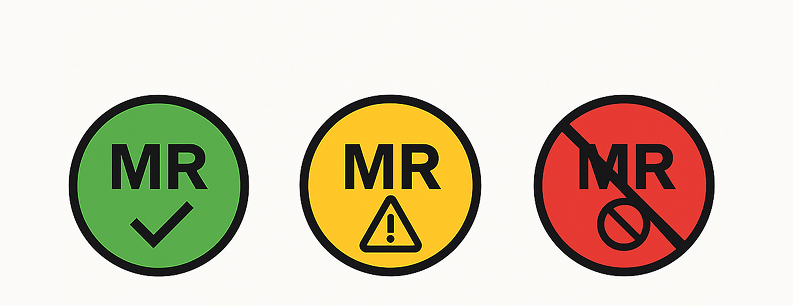
- MR Safe: Devices used near MRI machines must be labeled for MRI safety. The green “MR” symbol means the device is MRI safe, while yellow indicates it’s MR Conditional (safe under specific conditions), and red means MR Unsafe. While software alone usually doesn’t need these labels, any associated hardware (like sensors or tablets) might. For example, if a Bluetooth sensor has metal parts, it could be marked MR Unsafe with a warning in the IFU.
- MR Conditional: The yellow triangle “MR” symbol means the device is safe in an MRI environment, but only under specific conditions. These conditions may include factors like magnetic field strength or required placement distances. These details must be explained in the IFU. Software alone rarely needs this label, but if it’s used with hardware (like a laptop or interface near an MRI scanner), the setup might be marked MR Conditional based on where and how it’s used.
- MR Unsafe: The red circle with a slash over “MR” means the device must not be used in or near an MRI environment. This label is typically used for hardware, not software. However, if your software includes a physical accessory such as a metallic USB dongle or wearable, that component may need to display the MR Unsafe warning.
- Single Use / Do Not Reuse: The “Do not reuse” symbol (a struck-through curved arrow or the number “2” with a line) indicates that an item is for single use only. While this symbol doesn’t apply to software itself, it’s relevant if your software works with disposable accessories like sensors or electrodes. In such cases, the packaging for those components should display the symbol, and the software’s IFU should mention its use and any related instructions.

- Sterility and Sterilisation Method: If a device is supplied sterile, the label must clearly indicate this. It typically includes the word “STERILE” along with an icon or abbreviation showing the sterilisation method, such as “EO” for ethylene oxide or a radiation symbol. Pure software isn’t sterile, but if it’s delivered on a medium or with hardware in a sterile kit (e.g., a tablet for OR use), the appropriate sterility symbols must be used. More commonly, if your software runs on a sterile device (like a smart catheter), that device’s label will show the sterile symbol. The EU and UK both accept standardise ISO 15223-1 symbols. Never use a sterile symbol unless the product is actually sterile. Doing so is a serious regulatory breach.

- Caution / Warnings: The general warning symbol (a triangle with an exclamation mark) is used to signal important precautions and direct users to the IFU. MDR requires that any critical warnings be placed on the label or packaging. For software, these warnings may appear on the startup screen or as a pop-up. For example, “Not for primary diagnosis” or “For professional use only.” The warning symbol can also appear on the splash screen with a note like “See IFU for warnings.” While not every caution must go on the exterior label, anything essential to user safety should be visible at the point of use, with further detail in the IFU.
WARNING: Not for use on pediatric patients. The software’s algorithms have only been validated for adults. Use outside the intended patient population may lead to inaccurate results.
WARNING: Only use with compatible hardware specified by the manufacturer. Using the software on non-validated devices (e.g., untested smartphone models or OS versions) may result in erroneous data or app crashes.Such warnings would not all fit on a product label or app startup screen, so the label might just contain a general caution symbol directing the user to read the IFU thoroughly before use (often accompanied by the “consult instructions for use” book symbol).

- “Consult Instructions for Use” Symbol: This open book icon (often with an “i”) tells users there’s an IFU they need to read. Under MDR, some devices (including software) can use electronic IFUs instead of paper, but users must always be directed to them. Software might show this symbol during install, on first launch, or in the “About” screen, especially useful for apps distributed via app stores, where it can link to an online manual or eIFU.

Symbols are a powerful way to simplify medical device labelling and overcome language barriers. But they must be standardised. ISO 15223-1 defines most of the commonly used symbols, like those for “Manufacturer,” “Authorised Representative,” “Batch code,” and more. These are accepted in both the EU and UK. In the EU, you don’t need to explain these symbols if they come from the harmonized standard. In the UK, it’s also common to use them without explanation. Just make sure the symbols are correct and recognised and don’t create your own. If you must use a custom symbol, explain it clearly in the IFU.
5. Instructions for Use (IFU) and Language Requirements for Medical Software
Instructions for Use (IFU):
The IFU, or user manual, is a key part of medical device labelling. It provides essential details like the intended use, safety info, operating steps, warnings, and maintenance. Under EU MDR, most devices require an IFU. This is especially true for software. While very simple Class I or IIa devices might be exempt if they’re clearly safe without instructions, software almost always needs one. Even basic medical apps typically require guidance on proper use, and MDR mandates IFUs for all Class IIb and III devices. In short, if your software does more than something extremely basic, it should have an IFU.
UK IFU Requirements:
The UK MDR 2002 is based on older EU directives, so its IFU content requirements are broadly similar to the old MDD. If your IFU meets the newer EU MDR standards, it will also meet or exceed UK requirements. One key difference: EU MDR added new rules like declaring hazardous substances (e.g. CMRs or endocrine disruptors) in the IFU and on labels. UK law doesn’t require this explicitly, but many manufacturers still include it in UK IFUs for consistency and transparency, especially when selling the same product in both markets.
EU Language Requirements:
In the EU, medical device labels and IFUs must be in the official language or languages of the country where the product is sold, unless an exception is allowed. For example, France requires French, Germany requires German, and so on. While some countries may accept English for professional-use devices, this varies. MDR Article 10(11) and Annex I make clear that the user must be able to understand the information, so translation is usually required. For EU-wide distribution, manufacturers typically need to localise IFUs into multiple languages.
UK Language Requirements:
In the UK, all medical device labelling and IFUs must be in English. This applies across England, Scotland, and Wales. There’s no legal need to include Welsh or Scottish Gaelic. While EU IFUs may be multilingual, UK-specific versions should be in English (and may use UK spelling and terminology). For Northern Ireland, EU rules apply, so English is standard, though Irish may also appear.
Electronic IFUs (eIFUs):
Both the EU and UK allow electronic instructions for use in certain cases, though the EU has gone further in formalising this. Under EU Regulation 2021/2226, manufacturers can provide eIFUs instead of paper for specific device types intended for professional users. This includes software medical devices. So, for digital health products, it’s acceptable to offer a PDF manual or include instructions within the software itself.
To use eIFUs, manufacturers must meet several conditions: conduct a risk assessment to confirm that electronic access is as safe as paper; provide clear directions (like a URL or QR code) on how to access the IFU; offer a free paper copy upon request within 7 days; and ensure version control and information security. Packaging must clearly state that the IFU is electronic and include the eIFU symbol (typically a screen icon). The UK also permits eIFUs for certain products under similar conditions.
UK eIFU Requirements (Post-Brexit):
The UK takes a more cautious stance on electronic IFUs. Unlike the EU, it has not adopted the updated EU Regulation 2021/2226 that expanded eIFU use. While older EU Regulation 207/2012 may still influence UK practice for certain professional-use devices (e.g., implantables or software), its legal status post-Brexit is uncertain, as it was tied to the now-replaced EU directives.
As a result, the safest compliance strategy in the UK is to provide paper IFUs by default, especially for devices intended for lay users. For professional-use devices, eIFUs may still be acceptable, particularly for software, but manufacturers should check the latest MHRA guidance.
If an eIFU is used:
- Clearly indicate that the IFU is electronic (e.g., via an eIFU symbol and URL/QR code),
- Ensure users can request a paper copy free of charge,
- Ensure the information is version-controlled and securely hosted.
Until formal UK guidance is updated, erring on the side of caution with paper IFUs is recommended for full compliance.
Hybrid and Practical Approaches to eIFUs (Especially for Software):
Even though EU MDR permits fully electronic Instructions for Use (eIFUs) for certain device types, such as software and implantables used by professionals, many manufacturers adopt a hybrid approach. This helps ensure both usability and regulatory clarity.
A common method is to include a brief printed insert with essential safety info and a URL or QR code linking to the full IFU online. For software apps, in-app help or tutorials can serve as the IFU if they cover all required content (intended use, instructions, warnings, etc.), and the app’s page or packaging must clearly state that the IFU is electronic and include the eIFU symbol.
While the MDR allows paperless IFUs, some EU countries still require paper for home-use devices, so it’s safest to assess user needs and national expectations. Manufacturers must also ensure users can request a paper copy and that the electronic IFU is secure, accessible, and version-controlled.

6. Special Considerations for Apps and Cloud-Based Medical Software
Labelling medical software delivered through app stores or the cloud can be tricky without physical packaging, but the same rules still apply. Users must get all the necessary information. Here are some best practices and key requirements:
- Include key regulatory details somewhere in the app, like an “About” or “Legal” section. This should show the software name, version, manufacturer info, CE/UKCA marks (with numbers if needed), and a brief intended use.
For example: “ACME Diabetes Tracker v1.0 – ACME Corp, London, UK. CE 2797 – UKCA – Rx only. Intended to manage insulin dosage. See eIFU for full instructions.”
CE/UKCA logos can be shown on the splash screen or in settings. EU guidance says they should be visible at startup or easily accessible.
- App store descriptions, while not traditional labelling, should align with the IFU and clearly state that the app is a medical device. It’s good practice to include a line like: “This application is a CE-marked medical device. Intended use: …” along with the legal manufacturer’s name. This ensures transparency and keeps marketing consistent with the approved intended use.
- For electronic documentation, provide the IFU as a downloadable PDF on your website or within the app. The EU requires that the latest version is always available, with older versions archived. If your software updates often, maintain a clear IFU version history. Since MDR links the UDI to the software version, a major update (e.g. v1.0 to v1.1) means updating both the IFU and UDI-DI accordingly.
- For cloud-based platforms accessed via a web browser, ensure key labelling information is visible. This can include a banner on the login page (e.g., “This is a medical device. Please read instructions before use”) and details in a help or about menu. Provide a downloadable PDF version of the IFU directly from the interface, and include language options (e.g., a dropdown for English, German, French, etc.) if serving users across different countries.
- Software labelling must evolve with new safety information.If updates reveal new risks or contraindications (e.g., “Not for use with pacemakers”), manufacturers must revise the IFU and notify users. This is often done through in-app messages or release notes. Both EU and UK regulations require labelling to reflect findings from post-market surveillance, ensuring users stay informed and safe.
- Ensure digital IFUs are accessible. For example, by making PDFs screen-reader friendly for visually impaired users. While not strictly required by MDR, accessibility supports broader EU inclusion goals and is considered good practice.
For patient-facing apps, ensure the IFU and on-screen instructions use clear, lay-friendly language in the appropriate local language. MDR requires that information intended for patients be easy to understand and not overly technical.
Final Takeaway
Labelling for medical software in the EU and UK needs the same care as any other medical device. While the EU MDR is more modern and the UK still follows older rules, both aim to clearly inform users about what the software does, who made it, how to use it safely, and any limitations. Key details like the software version, CE/UKCA marks, and up-to-date IFUs are essential. These may be provided in either paper or digital format. But beyond compliance, good labelling helps real people use your software safely and effectively. Clear, accurate, and accessible labelling is about building trust and supporting better outcomes.
Euverify helps streamline medical software compliance by guiding you through MDR and UKCA requirements with expert support and practical tools. From labelling checks to IFU formatting and UDI readiness, we make sure your software meets the latest regulatory expectations with clarity and precision.